


Quick Catch-up
As you might’ve read from my other blog posts (mainly capstone), the remainder of the semester has turned into asynchronous learning over the distance. Together, the class pushed to have individual curated projects akin to Into to IM, with more contraptions behind it. While I was inclined to continue working on Flappy Bird, the scope of that project was bigger and more ambitious, designed for three people instead of single-person-work.
So, in this blogpost, we shall work on something that’s doable from home.
Materials and Tools Check!
After scouring all the tools available to me, here are some of the things that I can list:
- Cardboard boxes, a lot of them
- Cutter knives (not Xacto)
- Scissors
- Screwdrivers
- Rubber bands
- Battery and wired drills (need to have a new drill bit collection box)
- Wooden skewers
Things I can buy over the internet (1-5 days transport):
- pretty much everything, such as motors, actuators, metal sheets, CNC and 3D printing services, etc.
- these are the stores Tokopedia and Shopee, which are Amazon equivalent of SEA region.
Introducing: DIY walkers
My idea for the project for the remainder of the semester is to try out making a walker machine using servo motors, and attaching Arduino with non-wired power source such as batteries. I’ve scoured the internet to see some inspirations, and here are some, to a lot of extent, “doable” projects that I’ll be able to make:
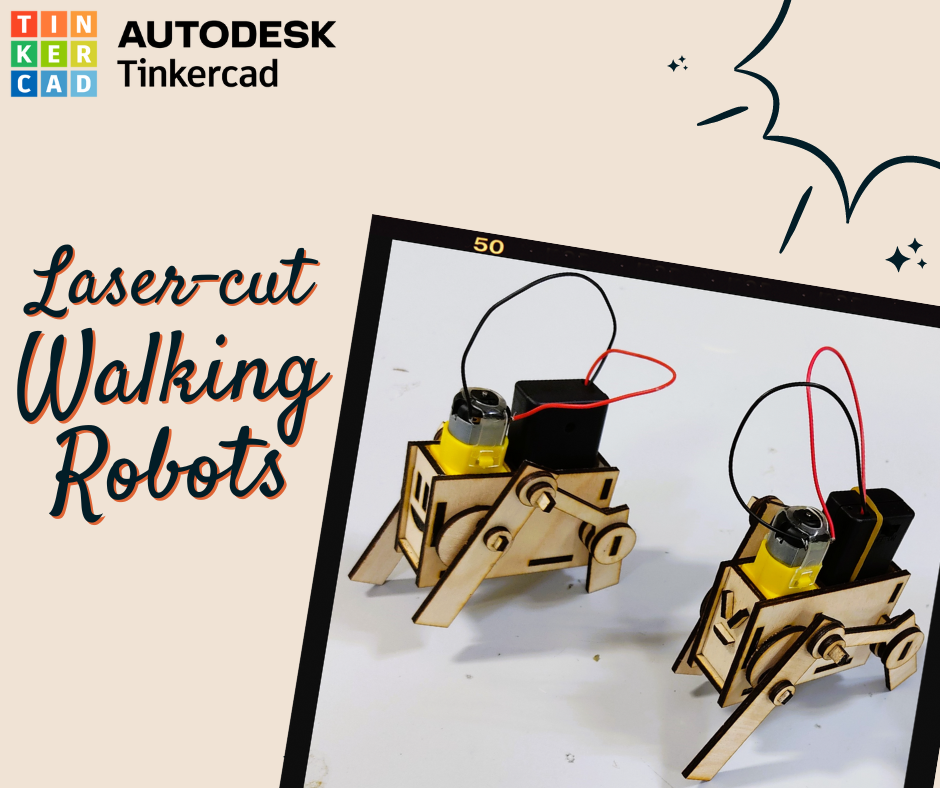
Notes:
- Scalability: doesn’t mean always go bigger, you can use specific sensors (control, give commands, etc.) and make the project bigger
- The idea of walking: balance on three legs, and move one. Basically find the center of gravity and then experiment.
- Experiment: Test the sequences wire up buttons with the servos so that we can figure out the combination sequences, or we could use p5.js
- Idea: use distance measuring sensor and see whether it moves forward or backward, learning to walk (Invent Algorithm) Tower Pro —> Good brand
Prog. Update (12 Apr): Shopping Cart List
For this week, my focus has been so much pivoted towards capstone that I almost forgot about this class. But, that being said, I spent quite some time researching two things: a) approaching this Quadrupedal robot through supporting lesson materials and b) searching for the stores that could provide me with all the necessary ingredients
Quadrupedalism
A form of locomotion in which animals have four legs that are used to bear weight and move around
Inverse Kinematics
A computational technique used in robotics and animation to calculate necessary joint angles and positions for a manipulator (arm, leg, or rig) to reach a specific end-effector target location and orientation. There’s a python simulation program that is pretty cool to play around with the concept.
Approaching the project
I think there are a few things that we need to consider:
- Motor stress test: We have to test out check out the servo motor’s weight tolerance and range of motion. This includes figuring out whether I need extra “supports” for the plastic headers, or they can move without slipping.
- Center of mass: Considering we might put Arduino + shield + battery pack, and maybe on top of cardboard, can we see where the contraption’s center of mass is?
- Motion experiment: Like they said, in theory there is no difference, but we do need to test out how the code translates to motion. Despite being slow, I think approaching using
"Crawling"might be fun, where only one leg moves at a time and the other three stay grounded.
Stores
I’ve also taken a look into a lot of stores from Tokopedia and Shopee.
- CNC Store Bandung This store is nice cause it contains all the components and tools in a single place so no extra delivery fees.
Below is the table:
| Item | Price (IDR) | Price (AED) | Qty | Total (AED) |
|---|---|---|---|---|
| Jumper Cable 15cm M-F 40pcs Multi-Color | Rp12,100 | dh2.59 | 1 | dh2.59 |
| Wire Cutter | Rp11,900 | dh2.55 | 1 | dh2.55 |
| Wire Stripper | Rp29,500 | dh6.32 | 1 | dh6.32 |
| TowerPro Servo SG90 | Rp14,900 | dh3.19 | 4 | dh12.77 |
| Arduino Extension Shield | Rp12,700 | dh2.72 | 1 | dh2.72 |
| Soldering Kit | Rp84,400 | dh18.09 | 1 | dh18.09 |
| Small Screwdriver | Rp3,000 | dh0.64 | 1 | dh0.64 |
| Header Pin Female 8P 10mm | Rp1,000 | dh0.21 | 4 | dh0.86 |
| Insurance, Delivery, Platform Fees | Rp76,400 | dh16.37 | 1 | dh16.37 |
| Total | Rp245,900 | dh62.91 |
Google Sheet link
Invoice will be provided if asked for
I removed the gear-based motor because they are slightly on the expensive side of things and I doubt I’ll need them.
Other stores I took a look at, but unless nothing is available on
CNC Bandung, then I’ll mostly refer to these: -Starelectric -Solusiperabot
Meeting Notes:
Stuff to consider when building the contraption:
- When powering multiple servos, It has the risk of drawing to much current, and then voltage drops down, and then arduino shuts down. A great way to reduce the risk is by only activating one servo at a time.
- Another alternative is by providing the power to the servo alternatively, maybe we can use battery pack for the servo motors, and then power to arduino from USB.
- On the shield, there is a way to power both the Arduino and the motors: so you have to select it, either by soldering wires or something. IF I GET THIS ONE.
- Consider the battery pack
Prog. Update (18 Apr): Servo-ing Up Some Serious Attitude
As the items that were ordered after previous meeting arrived, I began to tinker with a bunch of them. Mainly for this session, I wanted to consult about a) soldering, and b) wiring findings and issues that I came across. Building a great foundation on circuitry would benefit me a lot moving forward as I debug less on the wiring and more mechanical towards the walking machine in the future.
Servos
For this prototype, I’m working with four servo motors which currently are working together under a single program. Later on, I’d have to think about how to make them perform individually for collective locomotion.


Note (.../blog/machine-lab-journal/sketch_apr18a)
In this session, there’s a few parameters that I wanna check out, notably power distribution, wiring issues, and motor angle measurement. In the code, I programmed each servos to start at position = 0, which allowed to me see where they start, then have a set interval before moving back and forth. The code also uses no delay, rather relies on “internal clock” to ensure there’s no lag.
> [!Sketch_Apr18a]
#include <Servo.h> bool isMoving = false; . . . void loop() { // State management // Check if we are still at the initial waiting period if (!isMoving) { if (currentMillis >= waitTime) { isMoving = true; } return; } } . . . // Movement LogicIn the beginning, because the movement interval of the gear was too fast (or too short in between), I could not see how far 180° was. But tuning it to run slower does the job, so great!
Soldering-vaganza


Discussion: Apr 18
- I believe there’s a few reasons as to why the motors are acting the way they are right now, and mainly power. These motors take up a lot of current, and having power only straight from the 5V isn’t ideal. I already accounted for this with an extension shield that will be powered using AA batteries, but alas,
- The 20dhs soldering is as I expected.
- Strip wire and put them together and tape them preventing short circuit
- delay for three seconds in the setup
- Start swapping things to see what’s wrong, see if the wires, arduino, or something of the sorts
- Move the jumper to the other side of the breadboard
Following the meeting I’ve done some things:
- I tried swapping the motor wires to the same side of the breadboard and they still seem to lag, jitter, unstable in their movements
- I tested the motors individually, hoping if something is broken but no— they all can move 180 deg properly alone
- However, I observed once two motors are programmed to run, then things start to move erratically. At one point, I thought it comes down to one motor, swapped it and it gave same results
- Swapping the USB cable to a different laptop port doesn’t seem to help
Though I do notice, sometimes it works if all four are moving until it starts behaving inconsistently again. In the code, I tried to reprogram it such that only one motor moves till it finishes moving 180 deg, then move the other motors (Waterfall effect). I noticed a pattern occuring sometimes when a motor finishes the action, there’s this soft whirr and it tries to move again, while simultaneously the other motor is moving. Using delay also gives out the same results.
I’ve tried pinpointing the problem’s root and I still seem to unable figure out what’s causing it. I suspect it has something to do with the program signals being sent out perhaps?⛈️ 😢
Prog. Update (25 Apr): Fixing the pesky movement
After some tinkering and thoughts behind the machine, I’ve decided to let go of moving all four servos together and instead move them one-by-one from the program. The way that I did this was by iterating the available motors inside a list, and then writing to them. I’ve had to change some parts of the code, but it builds and borrows upon the previous code, which is writing to motors without any delay().
#include <Servo.h>
// Declare servosServo servos[4];int servoPins[] = { 3, 5, 6, 9 };
bool isMoving = false;int pos = 0;int step = 10;int currentServo = 0;
unsigned long lastMove = 0;const int interval = 50;const unsigned long waitTime = 3000;
void setup() { Serial.begin(9600); Serial.println("System Initializing...");
for (int i = 0; i < 4; i++) { servos[i].attach(servoPins[i]); servos[i].write(0); }
Serial.println("Waiting for startup delay...");tink}
void loop() { unsigned long currentMillis = millis();
if (!isMoving) { if (currentMillis >= waitTime) { isMoving = true; Serial.println("Movement Started!"); Serial.print("Moving Servo Index: "); Serial.println(currentServo); } return; }
if (currentMillis - lastMove >= interval) { lastMove = currentMillis;
pos += step; servos[currentServo].write(pos);
if (pos >= 180 || pos <= 0) { currentServo++; pos = 0;
if (currentServo >= 4) { currentServo = 0; }
// Debug output to track the sequence Serial.print("Switching to Servo Index: "); Serial.println(currentServo); } }
// CODE CONTENT FOR OTHER STUFF HERE!!!}What this code does is simple, instead of writing immediately to all servos, it checks which servo is currently active before moving the next one, indicated by the new variable currentServo. Then, once all servos have been turned, the counter turns back to 0. Here’s the showcase in Tinkercad because I’m away from home for now.
Prog. Update (May 2):
I’ve landed in Abu Dhabi which was nice, until the alerts started blaring again. Returning, I expected to be able to work on the project, accessing IM Lab and all its perks. Alas, despite visiting the place twice, it seems they were busy with checking back capstone equipments.
I emailed Prof. Aya this morning to see if I can gain access to the lab today or tomorrow before Thursday class, hoping for the best.


Learning Key Points:
There are a few things that I learned from doing this project after the Spring Break, moving between places, and trying to work on the project with limited access:
- In Theory, There is No Difference: There’s so many things that are easy when said and very difficult when it comes to execution. For example, the idea of moving one servo at a time is very simple, but when it comes to coding and debugging, things are bound to get wrong.
- Be Curious, and Tinker On: That being said, it was fun to actually plan and tinker with the project despite limitations. It made me realize how convenient the facilities and tools in campus were, and how much I took them for granted. But it also made me realize that with a bit of creativity and resourcefulness, we can still make things work.
- Planning can only go so much: I had a plan for the project, but when it came to execution, things didn’t go as planned. This made me realize that while planning is important, it’s also important to be flexible and adaptable when things don’t go as expected. Luckily, I brought the cardboard boxes with me, so I can still make a prototype of the walker machine, albeit with tools that I can borrow or get from convenience store.
- If Hell Lets Loose: Even if the entire physical thing is not working out for some reason, I found this interesting application called Webots, which is a web-based robotics simulator that allows you to create and program virtual robots in a 3D environment. It has a lot of features and tools that can help you learn about robotics and programming, and it can be a great way to continue working on your project even if you don’t have access to physical materials.
Extra References
- Quadrupedalism
- Adafruit Servo Shield » It uses different library to send code to the chip, and the chip can be different addresses.
- Soldering not melting? Fix tips video